Quick answer: DTF (Direct to Film) transfers work by printing a mirrored design with CMYK and white inks onto PET film, dusting it with hot-melt adhesive powder, curing the adhesive in an oven, then heat pressing the transfer onto a garment at 300–320°F before peeling the film away. The result is a vibrant, durable graphic that works on cotton, polyester, blends, leather, and more.
If you’ve ever wondered how a flat digital design turns into a vibrant, long-lasting graphic on a t-shirt, you’re not alone. DTF printing looks complicated from the outside, but once you break it into its individual steps, the process is remarkably logical.
At Limitless Transfers, we work with everyone from first-time hobbyists pressing their first gang sheet to high-volume print shops producing thousands of transfers a week. Regardless of experience level, the fundamentals of DTF printing stay the same: artwork, ink, adhesive, heat, and peel.
This guide walks through the complete DTF printing process step by step, from preparing your digital artwork to peeling the finished transfer off a cured, washable garment. By the end, you’ll understand exactly what happens behind the scenes every time you order a DTF transfer, and why this method has become a go-to choice for custom apparel businesses of every size over other traditional methods.
What Is DTF Printing?
Direct to Film (DTF) printing is a process where a design is printed onto a special PET film using pigment-based inks, coated with adhesive powder, and then heat pressed onto a garment or other surface. Unlike screen printing, which requires a separate screen for each color, DTF printing uses a digital file and can reproduce full-color designs, including photographs and gradients, without any setup fees.
DTF printing differs from other popular printing methods in a few key ways:
- Screen printing requires creating physical screens for each color, which makes it cost-effective at scale but impractical for small runs or highly detailed designs.
- DTG printing sprays ink directly onto the fabric itself, but it generally requires pretreatment on dark garments and works best on 100% cotton.
- Sublimation printing uses heat to turn ink into a gas that bonds with polyester fibers, but it only works on polyester and polymer-coated surfaces, and it does not perform well on dark fabrics.
DTF printing solves many of the limitations of these traditional printing methods. Because the design is printed onto film first, DTF transfers work on an exceptionally wide range of materials, including:
- Cotton
- Polyester
- Cotton blends
- Nylon
- Leather
- Canvas
- Wood
- Bags
- Rayon
- Many treated fabrics
Perhaps most notably, DTF transfers perform exceptionally well on both light and dark fabrics without requiring any fabric pre-treatment. This versatility is a major reason DTF printing has become a game changer in the custom apparel and the printing industry over the past several years.
Step 1: Preparing the Digital Artwork
Why Does Artwork Quality Determine the Final Print Quality?
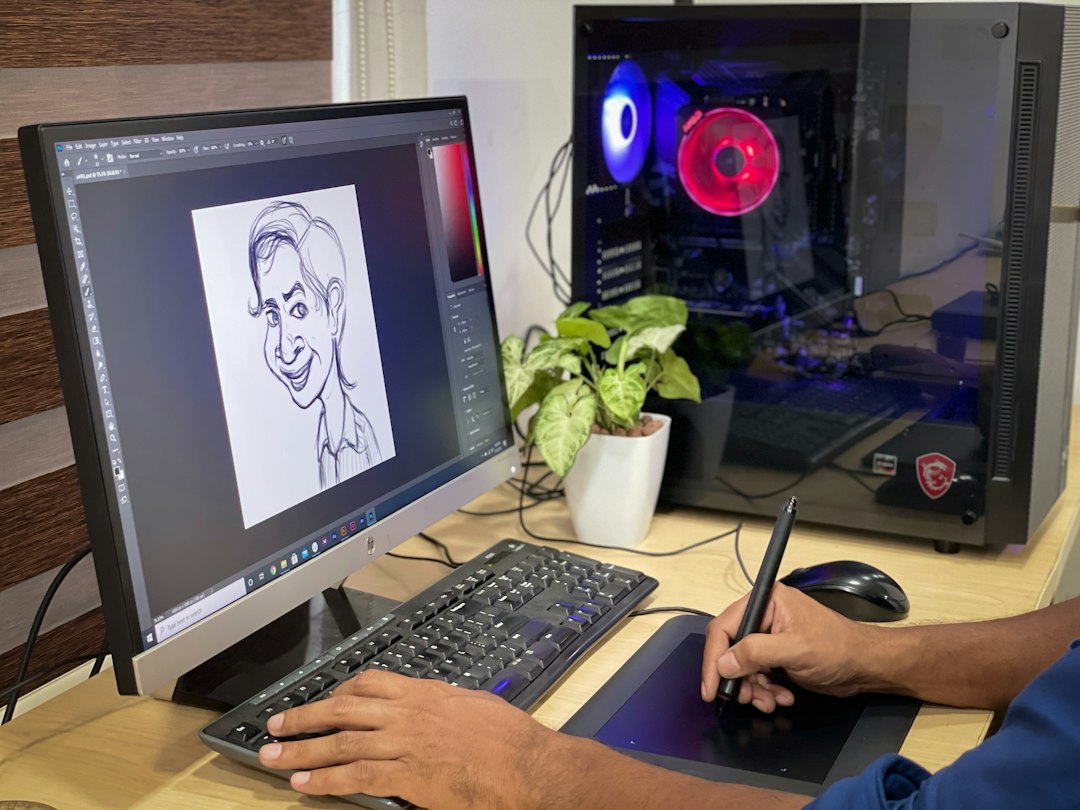
Every DTF transfer starts as a digital file, and the quality of that file directly determines how sharp, vibrant, and professional the finished print will look. Before a design ever reaches the printer, it needs to meet a few basic standards:
- High resolution: A high-resolution design (ideally 300 DPI or higher) creates sharper edges and reproduces small details far more accurately than a low-resolution file.
- Transparent backgrounds: PNG files with transparent backgrounds allow only the design itself to print, rather than a visible white box around it.
- Correct sizing: Designs should be sized to match their intended placement on the garment before upload.
- Proper color profiles: Using the correct color profile (CMYK rather than RGB) helps ensure the colors on screen match the colors on the finished transfer.
High-resolution designs also produce cleaner gradients and more vibrant colors once printed, which matters most on designs with fine linework, text, or photographic detail. According to Adobe’s guidance on image preparation, working with properly sized, high-resolution source files is one of the simplest ways to avoid pixelation and color loss during printing. For more specific advice on preparing PNG files, Adobe Express also offers helpful guidance on PNG best practices.
At Limitless Transfers, customers can prepare their artwork using our Gang Sheet Builder, or they can upload their own ready-to-print gang sheet file using our Upload by Size option. There are no minimum orders required, which means you can prepare a single design or a full sheet of mixed designs, whichever fits your project.
Step 2: Printing Onto DTF Transfer Film
How Does the DTF Printer Create the Design?
Once the artwork is ready, it’s sent to a specialized DTF printer. These printers use pigment-based CMYK inks along with white ink, and they print directly onto a roll of PET film that is approximately 0.75mm thick.
One detail that surprises many beginners: the artwork is printed upside down (mirrored) onto the film. This is because the transfer will eventually be flipped over and pressed face-down onto the garment. If the design weren’t mirrored during printing, text and asymmetrical graphics would appear backward on the finished shirt.
This digital printing process allows for impressive accuracy, capturing intricate designs, fine details, and vibrant colors in full color, without the setup costs associated with traditional printing methods like screen printing. Because the process is entirely digital, there’s no practical limit on the number of colors or the complexity of the artwork.
Key facts about this step:
- PET film is around 0.75mm thick.
- The design is printed upside-down (mirrored) onto the film.
- DTF printers use specially formulated pigment inks.
- White ink is a critical part of the printing process, which we’ll explain next.
Step 3: Why Does White Ink Matter in Direct to Film Printing?
White ink acts as the foundation layer underneath the colored inks. Without it, colors would sink into dark fabric and lose most of their vibrancy and opacity.
Here’s why white ink matters so much:
- Color vibrancy: White ink creates a solid base that allows CMYK colors to appear bright and true rather than muted.
- Opacity: It prevents the fabric color from showing through the design.
- Detail retention: Fine details and gradients stay crisp rather than blending into the garment color.
- Brightness: Designs maintain consistent brightness regardless of what color shirt they’re pressed onto.
This is especially important when printing on dark fabrics, including black shirts, where a design without a white ink base would appear washed out and transparent. Because DTF printing incorporates white ink as a standard part of the process, colors stay consistent whether you’re printing on a white tee or a black hoodie. Choose DTF printing over sublimation if your product line includes dark garments, since sublimation struggles to produce visible results on anything but light-colored polyester.
Step 4: Applying the Hot-Melt Adhesive Powder
What Does Adhesive Powder Do?
After printing, the film still has wet ink on its surface. At this stage, hot-melt adhesive powder is sprinkled evenly over the printed design while the ink is still wet. The powder sticks only to the areas where ink is present, which is what allows the adhesive to follow the exact shape of the design.
Once the powder has adhered, the excess is shaken or vacuumed off before the transfer moves to curing. Removing this excess powder is an important part of the adhesive application process. Leftover powder on the film can cause uneven bonding during pressing or create texture in areas that should remain clean, so this step directly affects the smoothness of the final garment.
Key facts about this step:
- Hot-melt powder applied over wet ink.
- The powder sticks only where ink exists.
- Excess powder is removed before curing.
Step 5: Curing the Adhesive
Preparing the Transfer for Application
With the adhesive powder in place, the transfer moves into a curing oven. This step melts the adhesive powder just enough to bond it to the printed design, locking it in place so the transfer can be stored, shipped, or applied later without the powder shifting or falling off.
Curing ovens typically operate at 160–170°C for this stage. This curing process stabilizes the film and activates the adhesive just enough to prepare it for heat pressing, without fully melting it onto a garment yet. Skipping or rushing this step can result in adhesive that doesn’t bond properly during the final pressing stage, so curing is considered essential before a transfer is ready for storage or shipping.
Key facts about this step:
- Transfers are cured in a curing oven.
- Curing temperatures typically range from 160–170°C.
- The adhesive must be properly cured before the transfer can be pressed.
Step 6: Preparing the Garment Before Pressing
Before the actual transfer goes on, most professionals pre-press the garment itself for 2–5 seconds. This quick step serves a few purposes:
- Removes residual moisture from the fabric
- Flattens wrinkles that could cause uneven adhesion
- Releases trapped steam that could interfere with the bonding process
This step applies across fabric types, including cotton, polyester, blends, leather, and nylon. A dry, flat, wrinkle-free surface gives the adhesive the best possible chance to bond evenly across the entire design.
Key facts about this step:
- Pre-pressing typically takes 2–5 seconds.
- It removes moisture from the garment.
- It also removes wrinkles that could disrupt adhesion.
Step 7: Heat Pressing the Transfer
How Does Heat Turn Film Into a Permanent Graphic?
This is the step most people picture when they think about DTF application. The cured transfer is positioned on the garment, usually with the help of placement guides or a ruler, and then a heat press machine applies medium to firm pressure at 300°F–320°F.
Heat, pressure, and time all need to work together here. The heat activates the hot melt powder, allowing it to melt and permanently bond the ink into the fabric fibers. Pressure ensures even contact across the entire design, while consistent temperature control prevents some areas from under-bonding while others scorch.
A heat press machine is strongly preferred over a household iron for this step. Irons can’t maintain consistent temperature or even pressure across a design, which often leads to peeling, incomplete bonding, or uneven finishes. A proper heat press machine distributes heat and pressure uniformly, which is critical for a transfer that needs to survive dozens of wash cycles. For those setting up a heat press station, OSHA’s guidance on heat press safety outlines useful precautions for handling high-temperature equipment safely.
Key facts about this step:
- A heat press machine is essential for proper adhesion.
- Medium to firm (high) pressure is applied.
- Pressing temperatures typically range from 300–320°F.
- Heat activates the adhesive and bonds the graphic to the fabric fibers.
Step 8: Hot Peel vs. Warm Peel vs. Cold Peel
Once the transfer has been pressed, the PET film needs to be peeled away, leaving only the printed design behind on the fabric. How and when you peel the film matters just as much as the pressing step itself.
- Hot Peel: The film is removed immediately while it’s still hot, right after pressing. This method allows for the fastest workflow and is ideal for high-volume production.
- Warm Peel: The transfer is allowed to cool slightly before peeling, which some producers prefer for specific adhesive formulations.
- Cold Peel: The transfer cools completely before the film is removed, which can take longer but is sometimes used with certain adhesive types.
At Limitless Transfers, we specialize in True Hot Peel Transfers. This means our transfer film can be removed immediately after pressing, which significantly speeds up production for businesses handling large or repeat orders. Peel method also has a notable effect on finish quality, production speed, and overall durability, so choosing a method suited to your adhesive and workflow matters just as much as nailing the pressing temperature.
Step 9: Post-Pressing for Maximum Durability
Many professional print shops add one more step after peeling: post-pressing. This involves placing a protective sheet (such as a Teflon sheet or parchment paper) over the finished design and pressing it once more.
Post-pressing offers several benefits:
- A smoother, more polished finish
- Improved wash durability over time
- A softer feel against the skin
- Stronger overall adhesion between the ink and fabric
While not strictly required, post-pressing is a simple extra step that noticeably improves the long-term durability of DTF prints, particularly for garments that will see frequent washing.
Why Do DTF Transfers Last So Long?
When every step above is done correctly with correct DTF technology, DTF transfers are known for their impressive durability. Proper adhesion, flexible inks, and premium adhesive formulations work together to create a design that moves with the fabric instead of cracking against it.
Garments decorated with properly applied DTF transfers can withstand over 50 industrial wash cycles without cracking, peeling, or fading. Colors stay bright, and the design retains its original texture and flexibility well beyond what many people expect from a printed graphic. That said, proper application matters just as much as the quality of the materials used. Even premium film, ink, and adhesive can underperform if curing, pressing, or peeling steps are rushed or skipped.
Caring for DTF Printed Garments
Choose the following care habits if you want a DTF-printed garment to last for years rather than months:
- Wash the garment inside out
- Use cold water
- Choose a mild detergent
- Avoid bleach
- Tumble dry on low heat or hang dry
- Avoid high heat exposure during drying
- Never iron directly over the printed artwork
The American Cleaning Institute offers detailed guidance on garment care symbols and washing best practices that can help you interpret care labels correctly. These habits may seem minor, but they make a significant difference in how long a DTF graphic maintains its original color and texture.
Why Are More Businesses Choosing DTF Over Other Printing Methods?
| Factor | DTF Printing | Screen Printing | Sublimation | DTG |
|---|---|---|---|---|
| Setup cost | None | High (per color) | Moderate | Low to moderate |
| Small batch friendly | Yes | No | Somewhat | Yes |
| Full-color designs | Yes | Limited | Yes | Yes |
| Works on dark garments | Yes | Yes | No | Requires pretreatment |
| Fabric compatibility | Very wide | Moderate | Polyester only | Mostly cotton |
| Material waste | Low | Higher | Low | Low |
| Turnaround | Fast | Slower for small runs | Fast | Fast |
Choose DTF printing if you need full-color designs on a mix of fabric types without paying setup fees for every color. Choose screen printing instead if you’re producing thousands of identical units in a single color scheme, where the per-unit cost advantage of screens outweighs the setup investment. Choose sublimation only if your entire product line is light-colored polyester, since it won’t perform on cotton or dark fabrics at all.
Beyond flexibility, DTF printing also produces less material waste than screen printing, since there’s no need to discard unused screens or ink after small runs. There are no minimums required to get started, which makes it especially appealing for growing businesses that need to scale gradually. For a broader look at how DTF and other decoration methods fit into the apparel industry, PRINTING United Alliance offers educational resources on heat transfer application and apparel decoration.
Why We Trust DTF Every Day at Limitless Transfers
We’ve built our entire business around getting the transfer process right, every single time. We were recognized as the 2024 & 2025 1st Place Quality winner in DTF printing, and that recognition reflects the care we put into every stage, from ink formulation to final peel testing.
We ship orders placed before noon EST the same day, and we offer free UPS Ground shipping on orders over $50. We don’t require minimum orders, whether you’re a hobbyist pressing a single design or a shop running a gang sheet with dozens of images. Our Gang Sheet Builder makes it simple to prepare artwork even if you’ve never designed a gang sheet before.
We also know that transfers are only part of the equation. That’s why we offer heat presses and supplies alongside our transfers, so you can source everything you need from one reliable partner instead of piecing together your setup from multiple vendors.
If you’re ready to see the difference true hot peel quality makes, upload your artwork today and experience professional-quality DTF transfers for yourself.
Final Thoughts On The DTF Printing Process
From artwork to finished shirt, the DTF printing process follows a clear, repeatable sequence: prepare high-resolution artwork, print it with CMYK and white inks onto PET film, apply hot-melt adhesive powder, cure the adhesive, pre-press the garment, heat press the transfer, peel the DTF film while hot, and post-press for extra durability.
Once you understand each stage, applying DTF transfers becomes a straightforward, repeatable process, whether you’re decorating one shirt at a time or running a full production line. If you’re ready to put this process into practice, build your first gang sheet or order custom DTF transfers today and see how simple professional-quality apparel decoration can be.
Frequently Asked Questions
What is DTF printing?
DTF (Direct to Film) printing is a method that prints full-color designs with CMYK and white inks onto PET film, then transfers them onto fabric using adhesive powder and heat. It works on nearly any fabric, including cotton, polyester, blends, nylon, leather, and canvas, because the design is applied via adhesive rather than absorbed directly into the fibers.
Does DTF come off in the wash?
When applied correctly and cared for properly, DTF transfers do not come off in the wash. Garments can withstand over 50 industrial wash cycles without cracking, peeling, or fading, provided the garment is washed inside out in cold water and dried on low heat.
How do I apply DTF transfers at home?
To apply a DTF transfer at home, pre-press the garment for 2–5 seconds to remove moisture and wrinkles, position the transfer carefully, then press it using a heat press machine at 300–320°F with medium to firm pressure. Peel the film away while hot, post-press with a protective sheet for added durability, and follow proper wash care afterward (cold water, inside out, no bleach).
Which is better, DTF or sublimation?
DTF printing works on a much wider range of fabrics, including cotton, blends, and dark garments, while sublimation is limited to light-colored polyester and polymer-coated surfaces. Choose DTF if you need full-color designs on cotton, dark shirts, or mixed fabric types; choose sublimation only if your entire product line is light-colored polyester apparel.