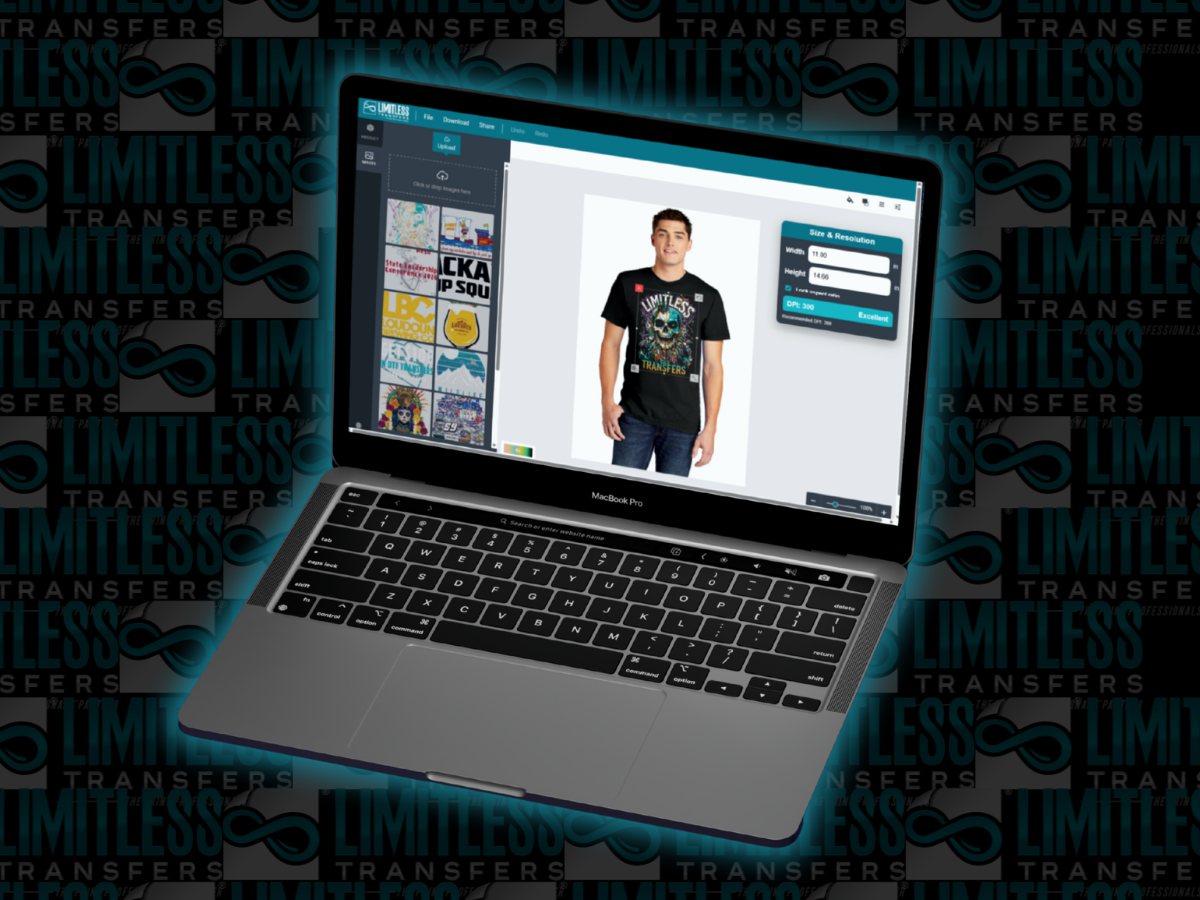
A custom DTF transfer should be sized based on the garment type, placement area, artwork resolution, and final print goal. Most full-front t-shirt designs are around 10 to 12 inches wide, left chest prints are usually 3 to 4 inches wide, and back prints are often 11 to 14 inches wide. With the Limitless Transfers Print Size Visualizer, you can upload your design, preview it on a real garment template, check the actual DPI, and download mockups before placing your order.
Creating the perfect custom DTF transfer requires more than just a great design. Before you even think about firing up your heat press, you must ensure your artwork is sized correctly for your specific garment. Getting the dimensions right directly impacts the print quality, the resolution of your file, and the overall look of the finished apparel.
Many creators and shop owners experience frustration when a design that looked great on a computer screen arrives completely out of proportion. Using the Limitless Transfers Print Size Visualizer eliminates this guesswork. You can simply upload your design and see exactly how it will look on a t-shirt, hoodie, or tank top before spending a single dollar.
By taking the time to verify your artwork dimensions, check the resolution, and preview the placement, you protect your investment. Properly sized DTF transfers mean you avoid wasted garments, blurry artwork, reprints, and unnecessary additional cost. Let Limitless Transfers help you achieve premium quality, direct-to-film results every single time.
Key Takeaways
- A custom DTF transfer should be sized based on garment type, placement, and artwork resolution.
- The Print Size Visualizer lets you upload your design and preview it before ordering.
- Most full-front t-shirt prints are 10 to 12 inches wide.
- Left chest prints are usually 3 to 4 inches wide.
- Back prints are often 11 to 14 inches wide.
- The tool shows the actual DPI at your chosen size, helping you protect print quality.
- You can download mockups for approvals, marketing, and customer previews.
- Previewing your design first can help you avoid costly reprints and ordering mistakes.
Why Custom DTF Transfer Sizing Matters For Every Order
A custom DTF transfer needs to be sized correctly before printing because the transfer size affects placement, resolution, appearance, and the finished product. Previewing the artwork first helps you avoid costly mistakes and get professional results.
A design can feature incredible detail and brilliant colors, but it will still look wrong if the size is off. For example, a print that looks perfect on an adult extra-large t-shirt may look ridiculously large on a youth shirt. Similarly, a left chest logo requires a drastically different size approach compared to a full front print. Making an image too large without sufficient resolution can severely lower the DPI, hurting your overall print quality.
Incorrect sizing frequently leads to wasted garments, ruined transfers, and unhappy customers. Taking a few moments to verify your dimensions ensures that your finished product reflects the great quality you intend to deliver.
How Premium DTF Transfers Help Create Professional Results
Premium DTF transfers are engineered to produce bold colors, clean details, and highly durable results. However, even premium quality transfers demand properly prepared custom artwork and precise sizing.
Limitless Transfers uses specially formulated DTF inks to support vibrant, long-lasting prints that withstand repeated washing. Good sizing practices help preserve the fine details, sharp edges, and thin lines within your artwork. Choosing the right transfer size ensures the final product looks clean, visually balanced, and retail-ready.
One major advantage of direct-to-film DTF is the ability to print unlimited colors without the strict color limitations found in some traditional decorating methods. Because Limitless Transfers products are rigorously tested, properly sizing your vibrant artwork guarantees you maximize these vivid color capabilities.
Custom Heat Transfers vs Screen Printing: Why Size Previewing Helps
Custom heat transfers are highly useful for small runs, bulk orders, highly detailed artwork, and one-off projects. Unlike some traditional screen printing jobs, custom DTF offers a highly flexible option for complex designs featuring multiple colors.
Direct-to-film processing usually bypasses the extensive setup process required by traditional screen printing. You avoid the heavy art fees and setup fees typically associated with burning multiple screens. Always review the ordering process to understand exactly what is included with your purchase. With DTF, you can easily submit artwork, dial in your specific dimensions, and order ready-to-press transfers with minimal friction.
For small businesses, apparel brands, and independent creators, custom DTF and custom heat transfers make it easier to order highly detailed designs without being locked into large order minimums.
How DTF Prints Look On A T-Shirt, Hoodie, Tank, Or Color Garment
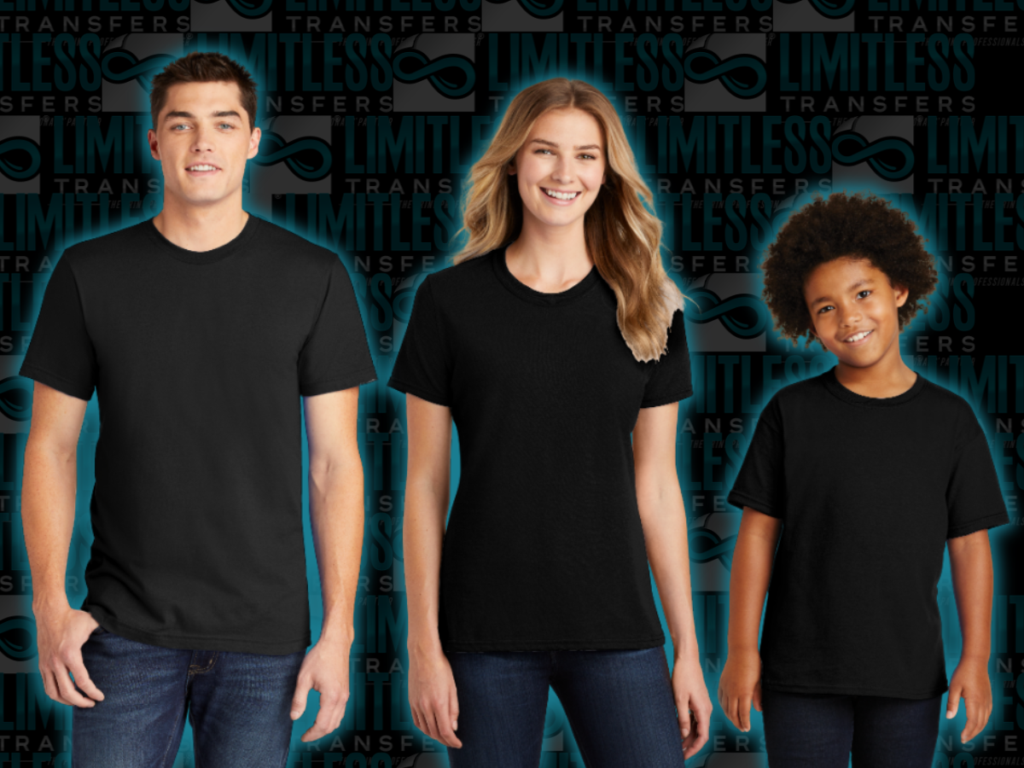
The same design can look completely different depending on the garment you choose. A full-front design that fills out a men’s tee nicely will likely need to be scaled down for a ladies’ tee. A hoodie pocket presents unique placement constraints compared to a standard T-shirt.
Furthermore, a back print usually requires a much wider layout than a front chest print. Applying artwork to a dark-colored garment may also change how you evaluate contrast, visibility, and spacing. Previewing your DTF prints on realistic garment templates helps you make smarter decisions before the transfer is ever printed.
The Limitless Transfers Print Size Visualizer offers several helpful templates, including:
- Men’s Tee Front
- Men’s Tee Back
- Ladies Tee Front
- Ladies Tee Back
- Youth Tee Front
- Youth Tee Back
- Hoodie Front
- Hoodie Back
- Men’s Tank Front
- Men’s Tank Back
- Ladies Tank Front
- Ladies Tank Back
Print Size Visualizer
Upload Your Design To See The Exact Size Before You Print
When you upload your design into the Print Size Visualizer, you can see how the artwork will look on a real garment before ordering your custom DTF transfer.
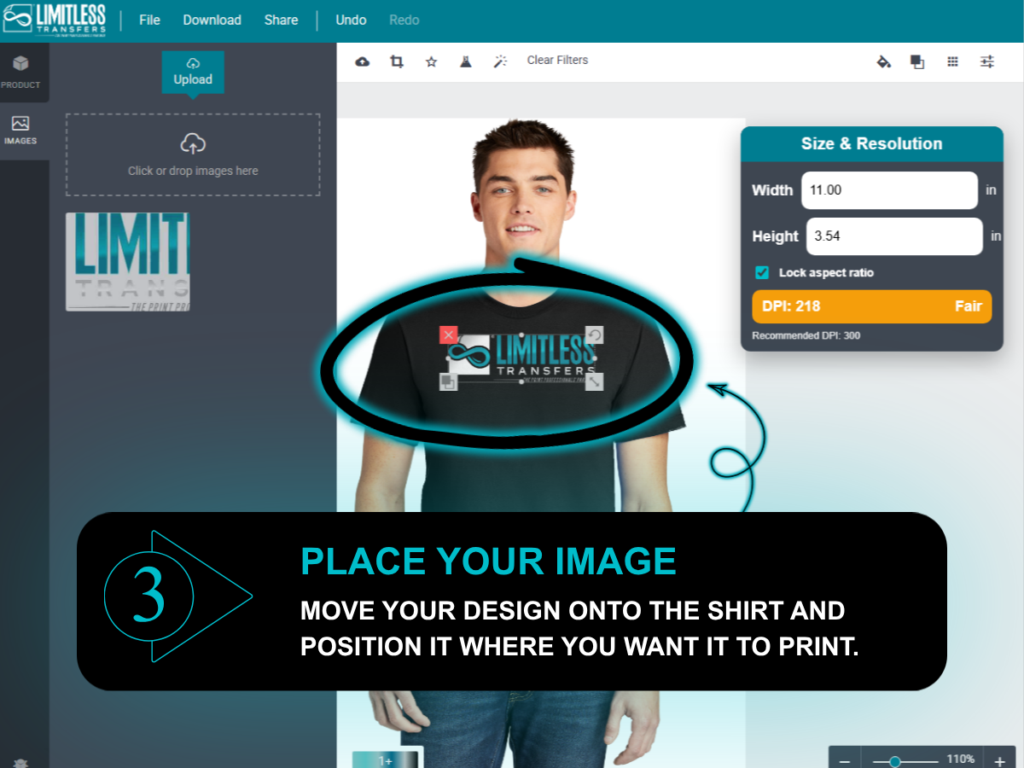
The tool allows you to upload your design as a PNG file and place it directly onto a realistic garment template. You can easily move it, scale it, and adjust the placement visually. Your uploaded files are stored for your convenience, completely removing the sizing guesswork. This feature proves especially helpful when you need to upload multiple designs or evaluate multiple images for different apparel placements. Simply upload your file, rely on the easy view interface, and submit artwork with total confidence.
Best File Format For A Custom DTF Transfer
The best file format for a custom DTF transfer is usually a high-resolution PNG with a transparent background because it helps preserve detail, placement, and print quality.
Always provide the best possible version of your custom artwork. Low-resolution images tend to look highly blurry when enlarged to fit a garment. If your design features thin lines, tiny text, or intricate small details, proper file preparation becomes even more important. A clean, high-resolution file improves print quality and streamlines the entire production workflow. Use preferred file types like high-quality PNGs to avoid background boxes and artifacts.
Know Your DTF Heat Transfer Resolution Before Ordering
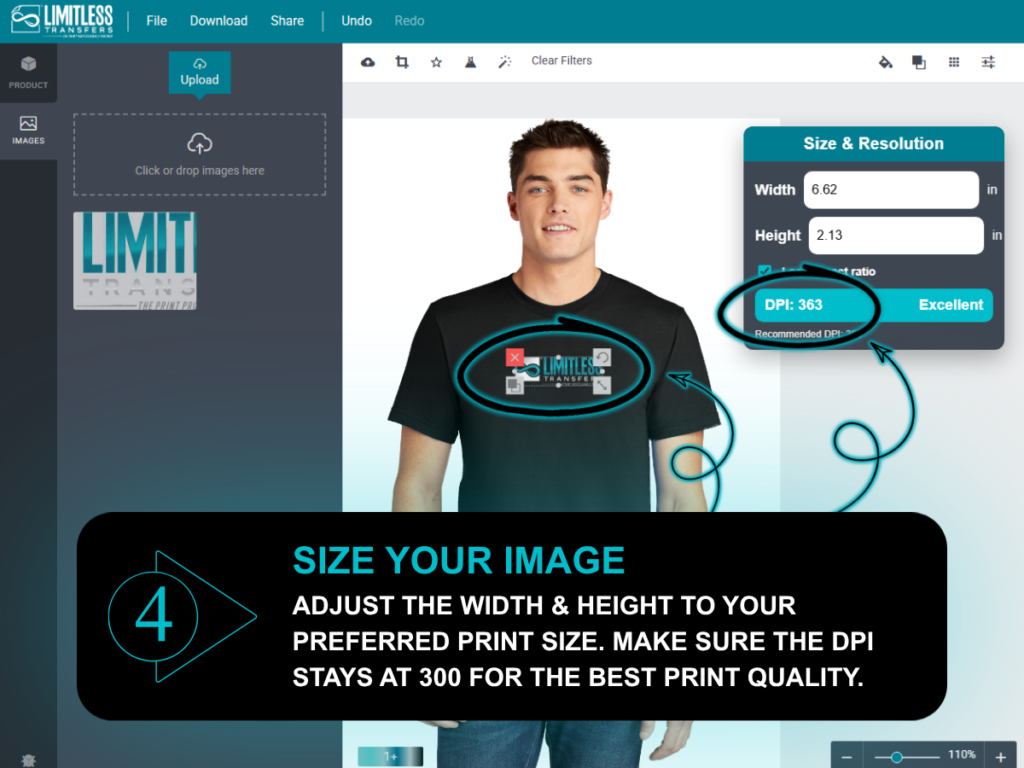
The Print Size Visualizer automatically calculates the actual DPI of your image at your selected print size. This allows you to verify that your DTF heat transfer will print clearly before you complete your purchase.
A design might look perfectly sharp at 8 inches wide, but quickly lose its premium quality if you stretch it to 11 inches wide. The visualizer tool gives you a reliable way to judge whether your artwork supports those custom sizes. Checking the resolution protects your investment by preventing blurry prints and frustrating reorders.
Example DTF Heat Transfer At 8 Inches Wide
- Width: 8 inches
- Height: 10.66 inches
- Resolution: 300 DPI
- Quality: Excellent quality for printing
Example DTF Heat Transfer At 11 Inches Wide
- Width: 11 inches
- Height: 14.66 inches
- Resolution: 218 DPI
- Quality: Fair quality for printing
Print Size Visualizer
Recommended Custom DTF Transfer Sizes For T-shirt Placement
While every design is unique, certain custom sizes serve as excellent starting points for apparel decoration. Most full front prints range from 10 to 12 inches wide. Left chest prints typically span 3 to 4 inches wide. Back prints generally measure 11 to 14 inches wide. Keep in mind that ladies’ garments often require designs scaled about 10% smaller than men’s, while youth prints scale down roughly 15% to 20%.
Full Front T-shirt Prints
Most full front DTF prints work well around 10 to 12 inches wide, depending on the specific shirt size and the overall shape of the design.
Left Chest Custom DTF Transfer Sizes
A standard left chest transfer is usually positioned over the pocket area and measures around 3 to 4 inches wide.
Back Print DTF Transfer Sizes
Back prints command more real estate and are often 11 to 14 inches wide, especially for standard adult garments.
Youth And Ladies Custom Sizes
When decorating a specific color garment for women or children, ladies’ prints are often slightly smaller than men’s, while youth prints require more aggressive scaling.
Print Size Visualizer
How DTF Gang Sheets And A Custom Gang Sheet Save Space
A custom gang sheet can help you fit multiple designs on one sheet, save space, and prepare several ready-to-press DTF transfers in one order.
A gang sheet lets you place multiple designs onto one continuous roll of film. DTF gang sheets are incredibly useful for small businesses handling bulk orders, apparel brands planning new drops, and event coordinators. Building a custom gang sheet reduces film waste and makes your ordering process highly efficient. You can use the visualizer to verify sizing before transferring the files to the gang sheet layout. This guarantees you do not accidentally size a design too large for your intended sheet size.
Using The Gang Sheet Builder After You Preview Your Design
First, verify your artwork dimensions using the Print Size Visualizer. Then, utilize the gang sheet builder to arrange your graphics efficiently. You can add multiple images or upload multiple designs to maximize your chosen sheet layout.
Make sure every single graphic is sized correctly before locking it onto the custom gang sheet. Preparing your files accurately makes the ordering process faster and easier. Always review your layout and submit artwork carefully to guarantee the perfect sheet.
How To Apply DTF Transfers With A Heat Press
Once your ready to press order arrives, you must apply DTF transfers correctly to guarantee longevity. A commercial heat press is heavily recommended because it delivers consistent heat, even medium pressure, and reliable curing.
Always follow the specific application instructions provided by Limitless Transfers. You may need to use parchment paper as a protective finishing layer during the final press. Depending on the exact product ordered, the film might require a hot peel or a cold peel. While some crafters attempt to use even a home iron, a dedicated heat press ensures the easy application and professional results you expect.
Direct To Film Printing, DTF Transfers Work, And Why Placement Matters
Direct-to-film printing produces high-quality transfers applied directly to garments using heat and pressure. DTF transfers work by printing vivid artwork onto a specialized film, coating the wet ink with an adhesive powder, curing the powder, and finally transferring the graphic using a press.
Placement matters heavily. A gorgeous, high-quality heat transfer will still look terrible if applied too high, too low, or completely off-center. The Print Size Visualizer assists you in dialing in the perfect placement long before the design becomes a finished product.
Premium Quality Results Depend On Artwork, Size, And Placement
Premium quality always begins with excellent custom artwork. From there, success depends entirely on choosing the correct size and layout. Always check your image resolution before ordering. Preview your placement to ensure the graphic flatters the garment.
Submit the proper file format, confirm your settings, and follow the easy application guidelines precisely. Because Limitless Transfers products are rigorously tested, you can trust that providing great quality art will result in truly professional results.
Can Glitter DTF Transfers And Specialty Prints Be Previewed Too?
Specialty items like glitter DTF transfers require the same careful sizing and placement planning as standard DTF prints. A vivid glitter effect fundamentally changes how bold and eye-catching the finished product feels.
You must still verify size, placement, and file resolution before placing your order. When designing for glitter DTF, ensure your artwork features clean details and avoids overly thin lines that might get lost in the textured finish. Always review any product-specific guidelines to maintain optimal print quality.
Custom DTF, Ultracolor Max, And Other Heat Transfer Options
You might be comparing custom DTF against other heat transfer options like Ultracolor Max, traditional vinyl, or classic screen printing. The best option for your business relies on your specific artwork, garment material, required quantity, and desired turnaround.
Custom DTF shines when you need highly detailed artwork, unlimited colors, custom sizes, and premium quality without severe color limitations. Focus on the factors that truly impact your bottom line: durability, vibrant color, sharp detail, fast production, and ease of use.
Fast Turnaround, Fast Shipping, And Orders Ship With Less Guesswork
When your artwork, size, and file format are ready before you order, the whole ordering process feels easier. You can submit artwork with more confidence, avoid preventable delays, and better understand when orders ship.
The Print Size Visualizer helps you prepare your files perfectly before checkout. Better file preparation eliminates back-and-forth communication. Clear mockups accelerate client approvals. Accurate sizing prevents the delays associated with blurry reprints. This allows Limitless Transfers to maintain their fast turnaround and fast shipping, often getting your transfers out the door by the next business day. Simply upload your design and let the automated tools do the heavy lifting.
Download Mockups Before You Order Your Custom DTF Transfer
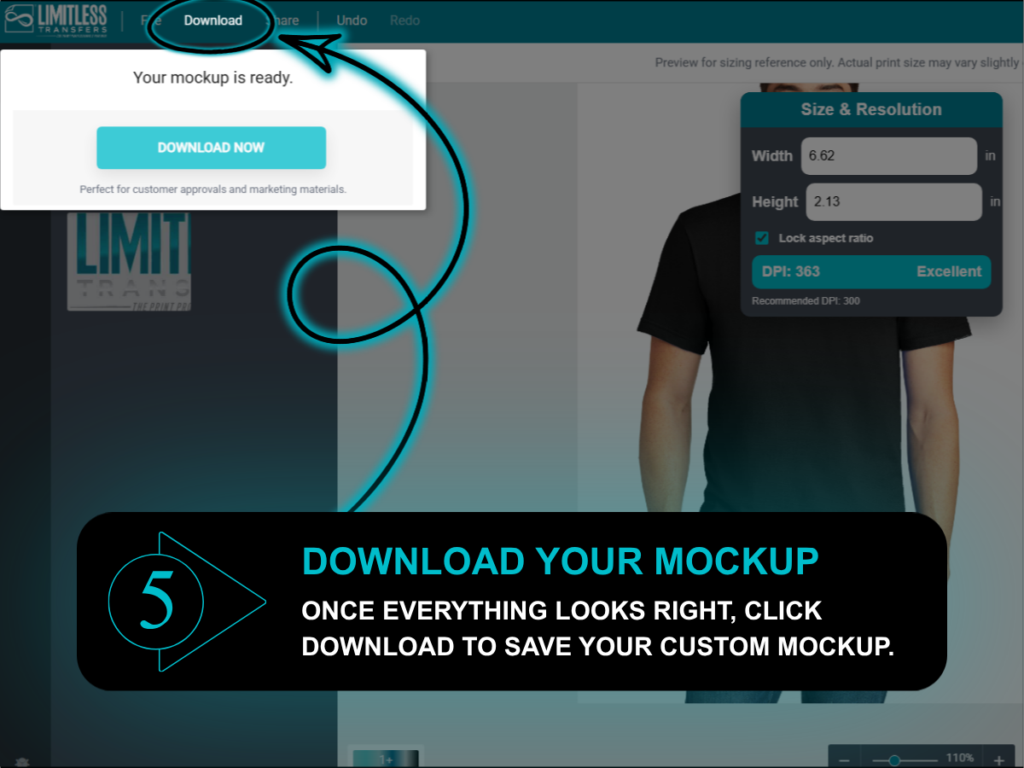
The visualizer tool allows you to download high-quality mockups of your custom DTF transfer instantly. These easy-view mockups are exceptionally useful for client approvals, marketing materials, online store listings, and general customer previews.
By showing your clients exactly how the artwork will look on the physical garment, you reduce confusion before the printing process begins. It guarantees everyone is on the same page regarding the final professional results.
Print Size Visualizer
Step-By-Step: Upload Your Design And Use The Print Size Visualizer
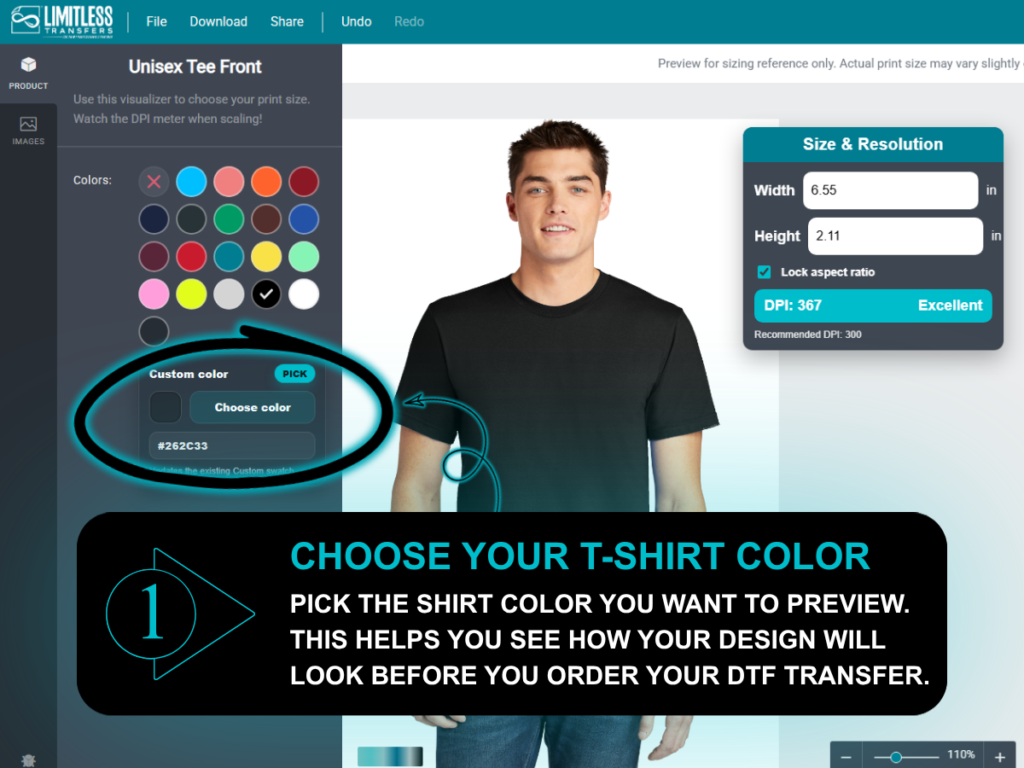
1. Choose A Garment Template
Start by selecting the garment and view that perfectly matches your upcoming project, such as a men’s tee front, youth tee back, hoodie front, or ladies tank back.
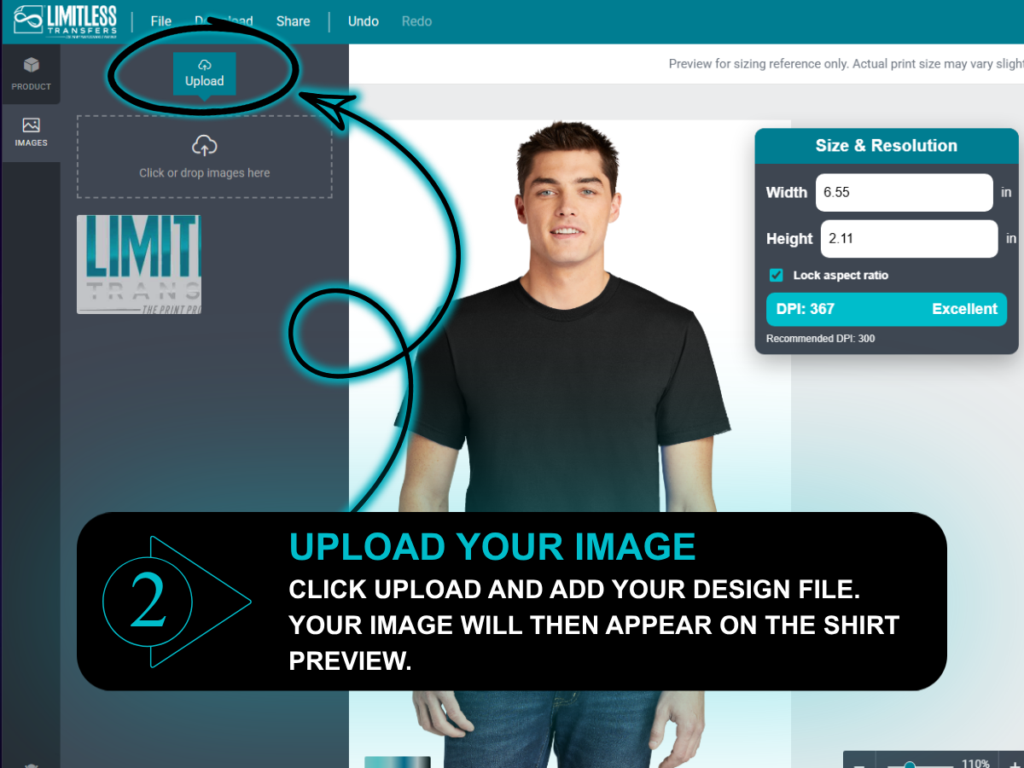
2. Upload Your Design
Simply upload your transparent PNG file. The tool stores your custom DTF transfer graphics for easy access.
3. Adjust The Size Visually
Click and drag to move, scale, and position your uploaded image. This allows you to evaluate the layout before printing.
4. Check The Resolution
Review the generated DPI rating at your selected size. Ensure the print quality indicates excellent or fair resolution to avoid pixelation.
5. Download Your Mockup
Save a clean, accurate mockup to use for client approvals, website marketing, or social media previews.
6. Build Your Gang Sheet Or Place Your Order
Once you confirm the size is correct, transition smoothly into the ordering process. Use the gang sheet builder if needed, and submit artwork with total confidence.
Print Size Visualizer
How To Wash Inside Out And Care For The Finished Product
For best results, strictly follow the care instructions included with your DTF transfers. In many cases, it helps to wash inside out so the print faces less friction during the wash cycle.
Proper aftercare ensures your finished product looks vibrant for years. Avoid harsh detergents or extreme heat drying if the official instructions advise against it. Treating the printed transfer gently secures long-lasting results.
Explore Helpful Resources For Better Custom DTF Transfer Results
Getting great results from a custom DTF transfer starts long before you press the design onto a garment. Your artwork quality, file format, sizing, placement, fabric choice, heat press settings, and care routine all affect how the finished product looks and lasts.
DTF transfers are created through a direct-to-film process that uses specially formulated DTF inks, premium film, adhesive powder, and heat application to create bold, detailed, ready-to-press transfers. When the process is done correctly, DTF can deliver bright colors, clean lines, soft finishes, strong durability, and professional results on t-shirts, hoodies, tanks, bags, and other custom apparel items.
One of the biggest advantages of DTF is flexibility. Compared to traditional screen printing, custom DTF transfers can be a great option for full-color artwork, small batches, one-off projects, bulk orders, custom gang sheets, and designs with multiple colors. Because there are fewer color limitations and no need for large order minimums, businesses can test new artwork, create seasonal products, manage inventory more easily, and keep the ordering process simple.
The resources below can help you better understand how DTF transfers work, how to prepare artwork, which preferred file types to use, how to avoid sizing mistakes, and how to apply DTF transfers for the best possible finish. They also cover helpful topics like curing, placement, transparent backgrounds, heat press pressure, garment compatibility, washing instructions, troubleshooting, and easy application.
- What Is Direct-to-Film Printing? A Guide to DTF Printing
- DTF: A New Way to Personalize Textile Printing
- The Pros and Cons of DTF and DTG Printing
- The Nuts & Bolts of Direct-to-Film Apparel Decorating
- The Tidal Wave That Is Direct-to-Film Apparel Decorating
- How to Identify High-Quality DTF Transfers
- 10 DTF Printing Mistakes and How to Fix Them
- Designing for DTF
- Designing for DTF Transfers
- Artwork Tips for DTF Transfers
- Direct-to-Film Transfers: Cricut Help Center
- TruePrint DTF Application Instructions
- Material Application Instructions from STAHLS’
- Heat Press 101 Tutorial
- Sizing and Placement Guidelines for T-Shirt Transfers
- How to Care for Clothes with Heat Transfers
- Ways to Properly Cure DTF Prints
- Heat Transfer Powder Curing Guide
- How to Print Direct to Film on Polyester and Performance Wear
- How to Create Special Effects with DTF Heat Transfers
Whether you are creating a single t-shirt, building a custom gang sheet, ordering DTF gang sheets for multiple designs, or preparing premium DTF transfers for customers, these resources can help you make smarter decisions before you print. The better your artwork, sizing, placement, and application process are, the better your finished product will look.
For best results, always follow the instructions included with your specific transfers. At Limitless Transfers, our DTF transfers are made for premium quality, easy application, strong color, smooth finishes, and long-lasting durability. With simple uploading, custom sizes, no large minimums, fast shipping, and tools like the Print Size Visualizer, you can feel more confident before every press.
Print Size Visualizer
Start Designing Your Custom DTF Transfer Today
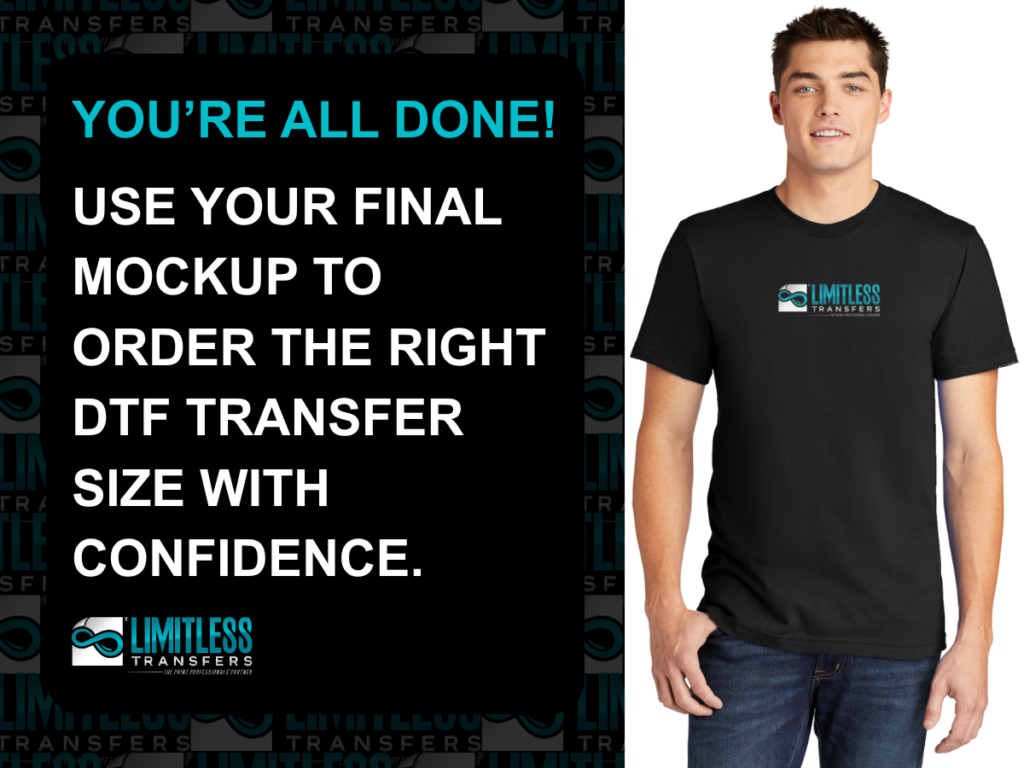
You never have to guess about print dimensions again. With the right tools, you can preview the exact size, check the DPI resolution, and download pristine mockups before you ever place an order.
Taking these quick steps helps you avoid costly errors, wasted apparel, and frustrating reprints. Whether you need a single graphic, multiple designs, large DTF gang sheets, or premium DTF transfers for your brand, accurate sizing is the secret to success.
Ready to get your custom DTF transfer right the first time? Use the Limitless Transfers Print Size Visualizer to upload your design, preview it on real garment templates, check the resolution at your chosen size, and download professional mockups in seconds.
Frequently Asked Questions About Custom DTF Transfer Sizing
What Size Should A Custom DTF Transfer Be For A T Shirt?
Most full-front t-shirt prints are around 10 to 12 inches wide, but the best size depends on the shirt size, design shape, and placement.
What File Format Should I Use For DTF Transfers?
A high-resolution PNG with a transparent background is usually the preferred file format for custom DTF transfers.
Can I Upload Multiple Designs For A Gang Sheet?
Yes. If you are building a custom gang sheet, you can upload multiple designs and arrange them based on the available sheet size.
How Do I Know If My DTF Print Will Look Clear?
Use the Print Size Visualizer to check the actual DPI of your design at the size you choose. Higher-resolution artwork usually produces better print quality.
Can I Use The Print Size Visualizer For Hoodies And Youth Shirts?
Yes. The tool includes garment templates for men’s, ladies’, youth, hoodies, and tanks, so you can preview sizing across different garment types.
Do I Need A Heat Press To Apply DTF Transfers?
A heat press is usually recommended because it provides consistent heat and medium pressure. Always follow the application instructions included with your transfer.
Can DTF Transfers Be Used On Cotton Polyester Blends?
DTF transfers are commonly used on cotton, polyester, and cotton polyester blends, but you should always confirm the best application instructions for your specific garment.
Are DTF Transfers Good for One-Off Projects?
Yes. DTF transfers can be a strong option for one-off projects, small business orders, custom apparel, events, and bulk orders.